
Shield: Antivirus Home Screen
Bacchus MediaPersonalization
4.412.75K Reviews
- Version
- 5.0.10
- Installs
- 5.00M
- Age Rating
- Everyone
Screenshots
Our Review of Shield: Antivirus Home Screen
 Analysis by Appyee
I tend to judge a phone security app by how it fits into ordinary routines, not by how dramatic its warnings sound. A household phone may be passed around, used for errands, or handed to a child for a quick task, so a security dashboard that is easy to find can be more useful than one buried in a folder. Shield: Antivirus Home Screen is built around that visible, home-screen presence, and that makes it worth considering for people who want a regular reminder to pay attention to device safety.
One phone, several everyday users
Picture a shared Android phone used to check a delivery, look up a recipe, and let someone else browse while dinner is being made. The person who installed the apps may not be the person using the phone at that moment. In that kind of routine, a clear security status can prompt the owner to check the device before or after others use it. It does not replace agreed household rules or careful decisions about what to install, but it can make security less easy to forget.
That distinction matters: a home-screen security tool is most useful when the person responsible for the device actually checks it and acts on what it shows. I would not treat a visible icon as proof that every action is safe. I would treat it as a convenient place to start, especially after installing unfamiliar software or helping someone troubleshoot a phone.
Keep account and device boundaries clear
Before setting up any security app on a shared phone, I would make sure the person who owns or manages the device is the one making decisions about installation and permissions. A child or guest should not be asked to approve prompts they do not understand. If a permission request appears, pause and read the explanation rather than tapping through just to finish setup. That small habit is more useful than assuming every prompt is routine.
Shield is a personalization-category app from Bacchus Media, and its home-screen approach gives it a different feel from a conventional antivirus utility that keeps every tool inside a separate dashboard. That can suit someone who wants security to stay visible. It may be less appealing if you prefer a minimal home screen, already use a security suite you trust, or do not want another app involved in how you manage device protection.
Coordination without confusing reassurance
For a household, the practical question is not only whether a scan is available; it is who checks the result and what happens next. I would pick one adult to handle installation and review, then tell other users how to flag a suspicious download or unexpected warning. This simple arrangement avoids the common problem of several people assuming that somebody else has dealt with an alert.
Shield is free to install, with optional in-app purchases, and it is rated for Everyone. Its broad age rating makes it suitable for general audiences in that sense, but it should not be mistaken for a family-management feature or a way to supervise another person’s activity. Parents still need to set appropriate device and account boundaries themselves. The app’s purpose is security, not household coordination.
What its reputation can and cannot tell you
The app has an average rating of 4.4 from around 168,000 ratings, with roughly 12,000 written reviews, and has passed five million installs. Those figures suggest that many people have tried it, but popularity cannot tell me whether it matches a particular phone, household routine, or comfort level with permissions. I would use the first setup as a chance to understand what the app asks for and whether its home-screen presence feels helpful rather than intrusive.
It first appeared on August 4, 2020, and version 4.0.37 is the current release. It supports Android 9 and later. If you are considering it for a device used by several people, check that the phone’s operating system meets that requirement before planning around it. The app is free, while in-app purchases range from $4.99 to $47.99 per item, so I would look closely at any paid option and decide whether it addresses a need you actually have.
When I would choose something else
If your main goal is to manage children’s screen time, approve downloads, or set separate boundaries for different users, I would look for tools designed specifically for those tasks. Shield should not be treated as a substitute for those controls. If you mostly want occasional reassurance and already have a security app built into your normal device setup, adding another scanner may create overlap rather than meaningful protection.
It is also worth remembering that antivirus tools cannot make every online choice safe. A scan does not replace keeping the operating system and apps current, avoiding suspicious links, and checking the source before installing something. For a shared device, I would explain that to everyone who uses it in plain language: if an offer or warning feels odd, ask the person responsible for the phone before proceeding.
A Fresh Take on Security
When I first downloaded Shield: Antivirus Home Screen, I wasn't sure what to expect. Unlike other antivirus apps cluttered with confusing menus, this one greeted me with a sleek and intuitive interface, right from the get-go. It’s like meeting someone who’s both smart and friendly, a rare combo in the app world!
Setup and First Impressions
The setup process was a breeze. Within minutes, I had the app installed and running. It asked for the necessary permissions, which might seem a bit daunting if you’re not tech-savvy, but the app guides you through each step with clear instructions. Kudos to the developers for making it so user-friendly!
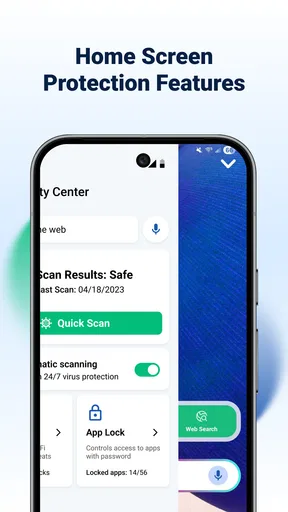
Once up and running, the app integrates seamlessly into your home screen. This isn’t just for aesthetics; having the antivirus functionality right where you can see it keeps security top of mind. It’s like having a personal bodyguard for your phone, always on alert.
Features that Stand Out
Now, let’s talk features. The real gem here is the real-time scanning capability. Whether you're downloading a new app or opening an email attachment, Shield: Antivirus Home Screen has your back with instant scans. It’s like having a digital watchdog that never sleeps.
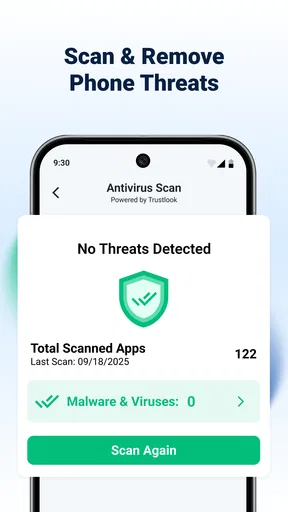
Another feature I loved is the app’s ability to detect and remove malware efficiently. You’d be surprised how many threats lurk in the corners of the internet, and knowing that my phone is protected gives me peace of mind.
Beyond the basics, the app offers a privacy advisor. This nifty tool checks your current apps for potential privacy breaches and suggests what you might want to reconsider. It’s like having a tech-savvy friend whispering advice in your ear.
Performance and User Experience
No one likes a slow phone, and thankfully, Shield: Antivirus Home Screen runs smoothly without hogging resources. It’s optimized to work quietly in the background, ensuring that your phone’s performance remains top-notch. I didn’t notice any lag or battery drainage, which is a huge plus in my book.
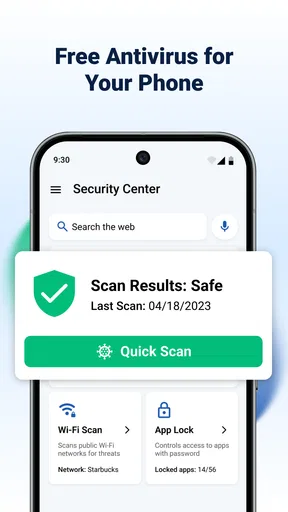
The app also features a clean and simple dashboard. At a glance, you can see your phone’s current status, recent scans, and any issues that need addressing. It’s straightforward and effective, just the way I like it.
Why You Should Consider It
In today’s digital age, safeguarding your personal information is crucial. With Shield: Antivirus Home Screen, you’re not just getting an antivirus; you’re investing in peace of mind. The convenience of having a powerful security tool on your home screen is unmatched.
Whether you’re a tech enthusiast or someone who just wants their device to run smoothly without hiccups, this app is worth trying out. It’s like having a personal security expert right in your pocket, always ready to protect your digital world.
In conclusion, if you’re looking for a reliable and efficient antivirus app that doesn’t overcomplicate things, Shield: Antivirus Home Screen should be at the top of your list. With its user-friendly design, robust features, and seamless integration, it’s a solid choice for anyone serious about mobile security.
Verdict
Strengths of Shield: Antivirus Home Screen
- Intuitive user interface, easy to navigate.
- Real-time protection against threats.
- Customizable scan frequency options.
- Low impact on device performance.
- Frequent updates for latest threats.
Limitations of Shield: Antivirus Home Screen
- Requires internet for full functionality.
- Limited features in free version.
- Occasional false positive detections.
- Ads can be intrusive at times.
- No dark mode available yet.
Similar Picks in This Category
View All
Microsoft SwiftKey AI Keyboard
SwiftKey4.3

Wallpapers
Google LLC4.1

Zedge™ Wallpapers & Ringtones
Zedge4.7

Yandex Browser with Alice AI
Direct Cursus Computer Systems Trading LLC4.3

Ringtone Maker:create ringtone
Big Bang Inc.4.7

Fonts Keyboard
Fonts Keyboard3.9
Frequently Asked Questions
What features does Shield: Antivirus Home Screen offer?
Shield: Antivirus Home Screen provides comprehensive protection for your device by scanning for malware, viruses, and other threats. It includes real-time scanning, a privacy advisor, and system optimization tools. The app also offers a customizable home screen widget for quick access to essential security features and updates.
Is Shield: Antivirus Home Screen free to use?
The app offers both free and premium versions. The free version includes basic antivirus protection and essential features, while the premium version unlocks advanced security options, ad-free usage, and priority customer support. Users can choose to upgrade to the premium plan through a subscription model.
How does Shield: Antivirus Home Screen impact device performance?
Shield: Antivirus Home Screen is designed to have minimal impact on device performance. It runs efficiently in the background and includes system optimization tools to enhance device speed and responsiveness. Regular updates ensure that the app remains light on resources while providing robust protection.
Can Shield: Antivirus Home Screen protect against phishing attacks?
Yes, Shield: Antivirus Home Screen includes features to protect against phishing attempts by scanning emails and browsing activities. It identifies and alerts users to potentially harmful links and websites, thereby safeguarding personal data and preventing unauthorized access to sensitive information.
How frequently is Shield: Antivirus Home Screen updated?
The developers of Shield: Antivirus Home Screen are committed to regular updates to ensure the app stays ahead of emerging threats. Updates typically include virus definition updates, new features, and performance improvements. Users can enable automatic updates to ensure they always have the latest protection.
